Secrets and network policies
Two features control what a sandbox does on the network:
- A secret lets code in a sandbox use an API key without ever holding it.
- A network policy decides which hosts a sandbox can reach.
Both run on the host, outside the sandbox, so code in the sandbox can neither read them nor change them.
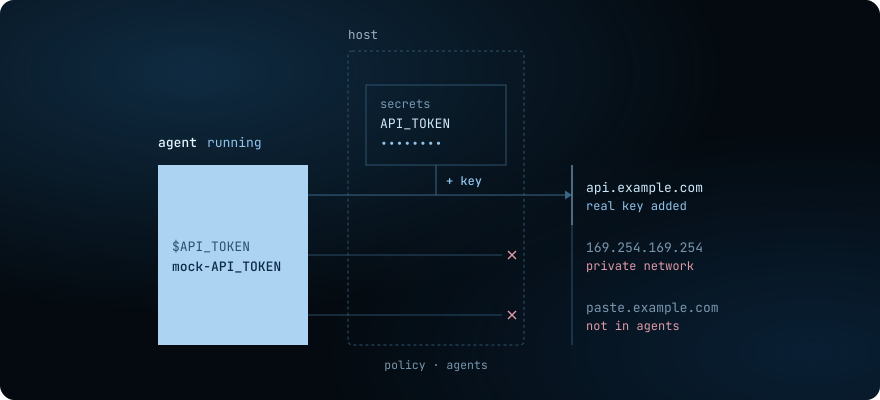
How a secret works
Section titled “How a secret works”- You store the key on the server.
shard secret setnames the hosts the key may go to, such asapi.openai.com. The daemon writes the value to one file undersecrets/in the data directory, with mode0600, so only the user the daemon runs as can read it. - You grant the secret to a sandbox. The sandbox gets a placeholder, such as
mock-OPENAI_API_KEY, in an environment variable of the same name as the secret. - The sandbox sends the placeholder as if it were the key. Its code puts the placeholder in a header of an HTTPS request, as any SDK does with a key.
- The egress proxy on the host receives the request. A sandbox with a secret sends its web traffic, on ports 80 and 443, through a proxy on the host. The sandbox trusts the proxy’s certificate authority, so the proxy can read the HTTPS request.
- The proxy puts the key in. When the request goes to a host the secret names, the proxy replaces the placeholder in the header with the real value. It checks the server’s certificate against the host’s trust store, then sends the request on over its own TLS connection.
The value exists only on the host: in its file, and in the proxy while it sends a request. Code that reads its environment, dumps its memory or uploads every file it finds gets only the placeholder.
A request to any other host, over plain HTTP, or on another port carries the placeholder unchanged. Secrets has the exact rules.
To set one up step by step, see Give a sandbox an API key with credential brokering.
How a network policy works
Section titled “How a network policy works”A policy is a named list of allow and deny rules, such as --allow api.openai.com --deny any. The first rule that matches decides, and the host drops any traffic that no rule allows. Three parts of the host enforce it:
- The host firewall judges every packet by its address and port. On Linux, these are rules in shard’s nft tables. On a Mac, a network stack inside the daemon judges every flow.
- The egress proxy judges web traffic on ports 80 and 443 by the host name in each request, because many names can share one address.
- The DNS resolver on the host answers only the names the policy allows, and answers
NXDOMAINfor the rest, so a lookup cannot carry data out.
The host rewrites the rules on every create, start, resume and fork, and on every policy change. A change to a policy reaches its running sandboxes at once, without a restart.
With or without a policy, the host drops traffic to private networks, to the cloud metadata address 169.254.169.254 and to other sandboxes, and no rule can open those. A sandbox without a policy reaches the rest of the internet.
Every decision goes into a log for each sandbox, which shard policy logs <sandbox> prints. For the rule syntax, see Write the rules. For the log, see Read the decisions.
To write one step by step, see Lock down network access with a policy.
How the two work together
Section titled “How the two work together”- A grant opens no host. The sandbox’s policy must allow a secret’s destination too. Under
deny any, the proxy denies the request, and the key never goes in. - Either one puts the sandbox behind the proxy. A sandbox with neither a policy nor a secret connects to every host directly.
- The sandbox record names them. It holds the policy’s name and the secrets’ names, never a value. Grant a secret or attach a policy to a
createdorstoppedsandbox, and the sandbox picks it up at its next start.